2011-05-10

ASP.NET MVC: Where is the ClientID?

,

For those who are used to program in ASP.NET know this scenario. You have a textbox and you want to do some custom validation in Javascript. You have to be able to access the textbox from the Javascript. The first thing you need to know is the Id for that textbox. You can’t hard code it, because you are not sure how ASP.NET will generate the Id. If the control exists in an INamingContainer, the INamingContainer will add some prefix to the Id of the control.

That is where the ClientID property comes to the rescue. This property contains the Id that will be used in HTML. Take a look at this example.

<%@ Page Title="Home Page" Language="C#" MasterPageFile="~/Site.master" AutoEventWireup="true"
    CodeBehind="Default.aspx.cs" Inherits="WebApplication1._Default" %>

<asp:Content ID="HeaderContent" runat="server" ContentPlaceHolderID="HeadContent">
</asp:Content>
<asp:Content ID="BodyContent" runat="server" ContentPlaceHolderID="MainContent">

    <script type="text/javascript" language="javascript">

        function ButtonClicked() {

            var element = document.getElementById('<%= MyTextBox.ClientID %>');

            alert('Value: ' + element.id);
        }
    
    </script>
   
   
   <asp:TextBox ID="MyTextBox" runat="server" />

   <button onclick="javascript:ButtonClicked()">Click Here</button>
</asp:Content>

In this example the Id of MyTextBox will be showed in a messagebox. Because MyTextBox is added in a Asp:Content control, the Id of this textbox will be prefixed with something. When we run the site and look at the source of the webpage, we will see it’s id.

<script type="text/javascript" language="javascript">
function ButtonClicked() {

var element = document.getElementById('MainContent_MyTextBox');

alert('Value: ' + element.id);
}
</script>

<input name="ctl00$MainContent$MyTextBox" type="text" value="dfd" id="MainContent_MyTextBox" />

<button onclick="javascript:ButtonClicked()">Click Here</button>

But how do we do this in ASP.NET MVC?


Take a look at this example. We use the TextBoxFor extension method to generate a textbox for our model. How do we figure out the Id that is used for the textbox?


@model MvcApplication2.Models.Person


@{

    ViewBag.Title = "Home Page";

}


<h2>@ViewBag.Message</h2>

<p>


   <script type="text/javascript" language="javascript">


       function ButtonClicked() {


           var element = document.getElementById("????");


           alert("Value: ??");

       }


   </script>


   @Html.TextBoxFor(m => m.Name);


   <button onclick="javascript:ButtonClicked()">Click Here</button>


</p>


You can hardcode the Id of the textbox ( “Name” ) in the javascript, but would it not be a lot  more beautiful or easier ( intellisense) if you could pas a lambda expression?


After looking in Reflector i saw that MVC uses this static class for generating an Id and it passes this Id to a static method of the TagBuilder class called “CreateSanitizedId”.


namespace System.Web.Mvc

{

    // Summary:

    //     Provides a helper class to get the model name from an expression.

    public static class ExpressionHelper

    {

        // Summary:

        //     Gets the model name from a lambda expression.

        //

        // Parameters:

        //   expression:

        //     The expression.

        //

        // Returns:

        //     The model name.

        public static string GetExpressionText(LambdaExpression expression);

        //

        // Summary:

        //     Gets the model name from a string expression.

        //

        // Parameters:

        //   expression:

        //     The expression.

        //

        // Returns:

        //     The model name.

        public static string GetExpressionText(string expression);

    }

}


Now that we know this, the only thing left to do is to create an HtmlHelper extension that will do exactly the same.


namespace System.Web.Mvc.Html

{

    public static class IdHtmlHelper

    {

        public static String GetIdFor<TModel, TProperty>(this HtmlHelper<TModel> htmlHelper, Expression<Func<TModel, TProperty>> expression)

        {

            return TagBuilder.CreateSanitizedId(ExpressionHelper.GetExpressionText(expression));

        }

    }

}


Now we can write our code like this:


@model MvcApplication2.Models.Person


@{

    ViewBag.Title = "Home Page";

}


<h2>@ViewBag.Message</h2>

<p>


   <script type="text/javascript" language="javascript">


       function ButtonClicked() {


           var element = document.getElementById("@Html.GetIdFor( m=> m.Name)");


           alert("Value: " + element.id);        

       }


   </script>


   @Html.TextBoxFor( m => m.Name)


   <button onclick="javascript:ButtonClicked()">Click Here</button>


</p>


When we render the page and look at the source, we can see that the Id is put in the getElementById method.

<p>

<script type="text/javascript" language="javascript">

function ButtonClicked() {

var element = document.getElementById("Name");

alert("Value: " + element.id);
}

</script>


<input id="Name" name="Name" type="text" value="John Doe" />

<button onclick="javascript:ButtonClicked()">Click Here</button>
</p>
Read more →

2011-05-03

ASP.NET MVC 3 and Unity using an IDependencyResolver

,

In this post i used a custom ControllerFactory for dependency injection. I created a custom ControllerFactory where i overrided the GetControllerInstance method. In this method i used the UnityContainer for creating instances of the requested controller.

In ASP.NET MVC 3 their is some build in abstraction for doing dependency injection ( IDependencyResolver ). I will change the example used in this post to use the IDependencyResolver.

the IDependencyResolver

The IDependencyResolver is a fairly easy interface. It contains only 2 methods:

  • object GetService (Type serviceType)
    • The GetService method is used to resolve a single registered service
  • IEnumerable<object> GetServices(Type serviceType)
    • The GetServices method resolves all registered services

In our case, we will create an UnityDependencyResolver. This implementation will accept an IUnityContainer and will use this container for resolving the requested types. If the DependencyResolver is unable to resolve a type, it should always return null for the GetService method and an empty collection for the GetServices method. That is why a try catch is used in the UnityDependencyResolver.

    public class UnityDependencyResolver : IDependencyResolver
    {
        IUnityContainer container = null;

        public UnityDependencyResolver(IUnityContainer container)
        {
            this.container = container;
        }

        #region IDependencyResolver Members

        public object GetService(Type serviceType)
        {
            try
            {
                return container.Resolve(serviceType);
            }
            catch
            {
                return null;
            }
        }

        public IEnumerable<object> GetServices(Type serviceType)
        {
            try
            {
                return container.ResolveAll(serviceType);
            }
            catch
            {
                return new List<object>();
            }
        }

        #endregion
    }


Registering the UnityDependencyResolver

Now that we created this dependency resolver, we have to register it so that the MVC framework will use it. This is done in the Global.asax, in the Application_Start method.

        protected void Application_Start()
        {
            AreaRegistration.RegisterAllAreas();

            RegisterGlobalFilters(GlobalFilters.Filters);
            RegisterRoutes(RouteTable.Routes);
            
            DependencyResolver.SetResolver(new UnityDependencyResolver(UnityConfigurator.GetContainer()));
        }

You could also register it inside a WebActivator.PreApplicationStartMethod.

Changing the UnityControllerFactory

In the UnityControllerFactory we now can use the IDependencyResolver that we registered to resolve the requested controllers. It doesn’t need to work with an IUnityContainer any more.

    public class UnityControllerFactory : DefaultControllerFactory
    {        
        protected override IController GetControllerInstance(System.Web.Routing.RequestContext requestContext, Type controllerType)
        {
            IController result = null;

            if (null != controllerType)
            {
                result = DependencyResolver.Current.GetService(controllerType) as IController;
            }

            return result;
        }
    }

Changing the UnityConfigurator

As you might have noticed the Application_Start method of the Global.asax has changed a bit. The line for registering our UnityControllerFactory has been removed (see this post ) . The MVC 3 framework will use it’s current DependencyResolver to resolve a ControllerFactory, so we have to register our UnityControllerFactory with the IUnityContainer. Now the MVC 3 framework will use our UnityControllerFactory as it’s default ControllerFactory.

public class UnityConfigurator
{
    public static IUnityContainer GetContainer()
    {
        IUnityContainer container = new UnityContainer();

        container.RegisterType<IControllerFactory, UnityControllerFactory>();
        container.RegisterType<ITitleRepository, TitleRepository2>(new HttpContextLifetimeManager<ITitleRepository>());

        return container;
    }
}


The result

If we run it, everything works just fine.

Read more →

2011-04-23

ASP.NET MVC and Unity

,

What is Unity?

The Unity Application Block (Unity) is a lightweight extensible dependency injection container with support for constructor, property, and method call injection. Dependency injection is used to create loosely coupled applications. These kind of applications are easier to maintain and easier to test.

What do we want to achieve?

We want to make our controllers loosely coupled and break any hard dependencies it has. Every object/resource that our controller needs, has to be automatically populated and correctly initiated by Unity.

The Asp.net mvc application

This is the HomeController that we have in our application.

    public class HomeController : Controller
    {
        ITitleRepository _titleRepository = null;

        public HomeController()
        {
            _titleRepository = new TitleRepository();
        }

        //
        // GET: /Home/
        public ActionResult Index()
        {
            ViewBag.Title = _titleRepository.GetTitle("Index");

            return View();
        }
    }

As you can see, it uses a TitleRepository. This repository is used to determine which title has to be rendered on a specific page.  

            _titleRepository = new TitleRepository();

This is the line that we want to remove. With this, we make a hard dependency between our HomeController and the TitleRepository.

    public interface ITitleRepository
    {
        string GetTitle(String page);
    }

    public class TitleRepository : MVCWebsite.Repository.ITitleRepository
    {
        public String GetTitle(String page)
        {
            return String.Format(" This is a Title for the page: {0}", page);
        }
    }


Using Unity

Adding references

Add the Microsoft.Practices.Unity dll to you project. Unity can be found at http://unity.codeplex.com/.

Creating a custom LifetimeManager

When you register a type with Unity, you can also specify a lifetime of this type. If you don’t specify a lifetime, Unity will create a new instance of that type each time that the type is requested. In an Asp.Net application, we can make the LifetimeManager cache or store the created objects in the HttpContext HttpSession or HttpApplication. In my case, i want a singleton per request.

    public class HttpContextLifetimeManager<T> : LifetimeManager
    {
        public override void SetValue(object newValue)
        {
            HttpContext.Current.Items[typeof(T).AssemblyQualifiedName] = newValue;
        }

        public override object GetValue()
        {
            return HttpContext.Current.Items[typeof(T).AssemblyQualifiedName];
        }

        public override void RemoveValue()
        {
            HttpContext.Current.Items.Remove(typeof(T).AssemblyQualifiedName);
        }  
    }

Creating the UnityContainer

Next in line is the creation of a UnityContainer. This container will be used to resolve certain types. In order to work, we have to register these types. In our case, we our going to register the ITitleRepository type with the TitleRepository type. This will mean that if we ask the container to resolve the ITitleRepository, it will return a TitleRepository object. As you see, i pass the HttpContextLifetimeManager as parameter.

public class UnityConfigurator
{
    public static IUnityContainer GetContainer()
    {
        IUnityContainer container = new UnityContainer();

        container.RegisterType<ITitleRepository, TitleRepository>(new HttpContextLifetimeManager<ITitleRepository>());

        return container;
    }
}

Now we are registering our type hardcoded. It is also possible doing this in the config file.

Creating a Controller Factory

We need to create a custom Controller factory to replace the default factory that is used by the MVC framework. Our factory accepts a IUnityContainer as parameter. This container contains all the types we registered.

We only need to override the GetControllerInstance method. In this method we have to use the container to create an instance of the requested controller. This way, Unity will automatically resolve the requested types for this controller. In our case: ITitleRepository.

    public class UnityControllerFactory : DefaultControllerFactory
    {
        IUnityContainer container = null;

        public UnityControllerFactory(IUnityContainer container)
        {
            this.container = container;
        }

        protected override IController GetControllerInstance(System.Web.Routing.RequestContext requestContext, Type controllerType)
        {
            IController result = null;

            if (null != controllerType)
            {
                result = container.Resolve(controllerType) as IController;
            }

            return result;
        }
    }


Now we have to tell the MVC framework to use the UnityControllerFactory as it’s default controller factory. This is done best in the global.asax, in the Application_Start method.

protected void Application_Start()
{
    AreaRegistration.RegisterAllAreas();

    RegisterGlobalFilters(GlobalFilters.Filters);
    RegisterRoutes(RouteTable.Routes);
    ControllerBuilder.Current.SetControllerFactory(new UnityControllerFactory(UnityConfigurator.GetContainer()));
}


Breaking the dependency

Now we have to modify our HomeController. We change it’s constructor to accept an object of the ITitleRepository type.

    public class HomeController : Controller
    {
        ITitleRepository _titleRepository = null;

        public HomeController(ITitleRepository titleRepository)
        {
            _titleRepository = titleRepository;
        }

        //
        // GET: /Home/
        public ActionResult Index()
        {
            ViewBag.Title = _titleRepository.GetTitle("Index");

            return View();
        }
    }

The result

When we go to the index of the HomeController, our UnityControllerFactory comes in action and Untity will inject the TitleRepository in the constructor of the HomeController.

When i want to use another implementation of the ITitleRepository, i only have to change the GetContainer method of the UnityConfigurator and the HomeController will automatically be injected with the new implementation.

    public class TitleRepository2 : MVCWebsite.Repository.ITitleRepository
    {
        public string GetTitle(String page)
        {
            return String.Format("{0} is the Title for this page!", page.ToUpper());
        }
    }

public class UnityConfigurator
{
    public static IUnityContainer GetContainer()
    {
        IUnityContainer container = new UnityContainer();

        container.RegisterType<ITitleRepository, TitleRepository2>(new HttpContextLifetimeManager<ITitleRepository>());

        return container;
    }
}

Read more →

2011-04-06

NHibernate in combination with a webservice

,

In this post i ‘ill try to explain how you can make NHibernate interact with a webservice to fill in a certain object.

Current situation

This is the current situation that we have.
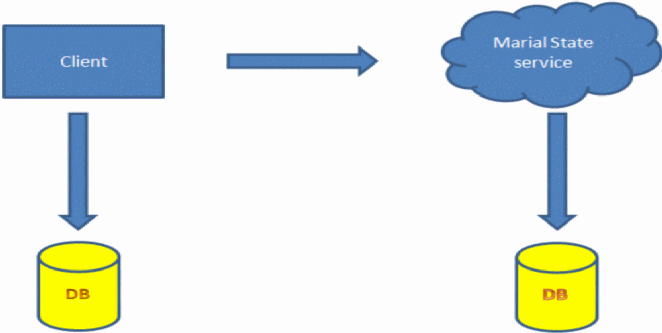
  Current situation


We have a webservice called “Marial State service”. This service is responsible for all marial states available.
This service has only 2 methods:

  • GetAll()
    • Gives all the available marial states
  • GetById(Int32 id)
    • Gives a specific marial state by it’s id

The client is an application that has it’s own database and uses NHibernate as ORM. The client is responsible for creating/updating/deleting persons in his database. So in the database we find a table called “Person” with contains all the data.
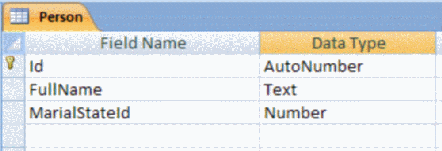
 Person Table

As you can see, the person, has a marial state which comes from the MarialState service.
For those who noticed, yes i am using an Access as database. Here you can find the needed DLL.

The MarialState service

I created 2 new projects in visual studio. One which contains the model off the service.
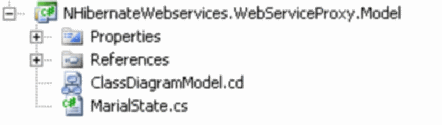
 Webservice Model

namespace NHibernateWebservices.WebServiceProxy.Model
{
    public class MarialState
    {
        public Int32 Id { get; set; }
        public String Description { get; set; }
    }
}


And another project for the service logic. As you can see this isn’t a real service. I am mocking it.

 Webservice Logic

namespace NHibernateWebservices.WebServiceProxy
{
    public static class MarialState
    {
        public static List<Model.MarialState> GetAll()
        {
            return new List<Model.MarialState>
                                {
                                    new Model.MarialState { Id = 1, Description = "Single"}
                                    ,new Model.MarialState { Id = 2, Description = "Married"}
                                    ,new Model.MarialState { Id = 3, Description = "widower"}
                                };
        }

        public static Model.MarialState GetById(Int32 id)
        {
            return GetAll().SingleOrDefault(m => m.Id == id);
        }
    }
}

The client

At client side the we created a business object  called “Person” which will map at the Person table in it’s database.

public class Person
{
    public virtual Int32 Id { get; set; }
    public virtual String FullName { get; set; }
    public virtual Int32 MarialStateId { get; set; }
}

This is the mapping file for the “Person” entity.

<?xml version="1.0" ?>
<hibernate-mapping xmlns="urn:nhibernate-mapping-2.2">
    <class name="NHibernateWebservices.Model.Person, NHibernateWebservices.Model"
         table="Person">
    <id name="Id"
        column="Id"
              unsaved-value="0">
      <generator class="increment" />
    </id>
   
    <property column="FullName"
              name="FullName"
              type="String" />

    <property name="MarialStateId"
             column="MarialStateId"
             type="int"/>
   
  </class>
</hibernate-mapping>


Now How to get the data?

First try

The most easy way to get the MarialState entity would be to write something like this.

public class Person
{
    public virtual Int32 Id { get; set; }
    public virtual String FullName { get; set; }      

    private Int32 marialStateId;
    public virtual Int32 MarialStateId
    {
        get
        {
            return marialStateId;
        }
        set
        {
            marialStateId = value;
        }
    }

    public virtual WebServiceProxy.Model.MarialState MarialState
    {
        get
        {
            return WebServiceProxy.MarialState.GetById(marialStateId);
        }
        set
        {
            marialStateId = (null == value) ? (0) : (value.Id);
        }
    }
}

This solution will work, but I can see several things that I am not happy with. First of all it’s a lot off extra code. In this case the “Person” entity is very simple, but what if it was complex and you needed to get other data from a service, you would be writing a lot of code looking like this.

Second, in this approach you need to create a reference between the WebServiceProxy and the business Model of the client. At this point the business Model of the client is also responsible to fill it’s own data instead of only validating against business rules.

Using NHibernate IUserType

The ideal situation would that we ask NHibernate to give use a “Person” and that everything, including MarialState object, would be filled automatically. You can do this if you create a new NHibernate IUserType object. IUserType is an interface which allows you to plug in into the NHibernate mapping process and handle it your self.

public class MarialStateUserType : IUserType
{
    public object Assemble(object cached, object owner)
    {
        return DeepCopy(cached);
    }

    public object DeepCopy(object value)
    {
        return value;
    }

    public object Disassemble(object value)
    {
        return DeepCopy(value);
    }

    public int GetHashCode(object x)
    {
        return x.GetHashCode();
    }

    public bool IsMutable
    {
        get { return true; }
    }

    public object NullSafeGet(System.Data.IDataReader rs, string[] names, object owner)
    {
        object obj = NHibernateUtil.Int32.NullSafeGet(rs, names[0]);
        WebServiceProxy.Model.MarialState marialState = null;

        if (null != obj)
        {
            marialState = WebServiceProxy.MarialState.GetById(Convert.ToInt32(obj));
        }

        return marialState;
    }

    public void NullSafeSet(System.Data.IDbCommand cmd, object value, int index)
    {
        WebServiceProxy.Model.MarialState marialState = value as WebServiceProxy.Model.MarialState;

        var parameter = (IDataParameter)cmd.Parameters[index];
        if (null == marialState)
            parameter.Value = DBNull.Value;
        else
            parameter.Value = marialState.Id;
    }

    public Type ReturnedType
    {
        get { return typeof(WebServiceProxy.Model.MarialState); }
    }

    public SqlType[] SqlTypes
    {
        get { return new SqlType[] { NHibernateUtil.Int32.SqlType }; }
    }

    public object Replace(object original, object target, object owner)
    {
        return original;
    }

    public new bool Equals(object x, object y)
    {
        if (object.ReferenceEquals(x, y)) return true;
        if (x == null || y == null) return false;
        return x.Equals(y);
    }
}

This it the custom IUsertype that is created for the MarialState entity. In this example, these are the most interesting parts of code:

  • ReturnedType
  • SqlTypes
  • NullSafeGet
  • NullSafeSet


ReturnedType/SqlTypes properties

The ReturnedType and SqlTypes properties tells NHibernate which type to expect. The ReturnedType property contains the type of object that this IUsertype has to return. In our case it is a MarialState object.

public Type ReturnedType
{
    get { return typeof(WebServiceProxy.Model.MarialState); }
}

The SqlTypes property tells how the object is mapped in the database. Here the MarialState object is mapped to a numerical column.

public SqlType[] SqlTypes
{
    get { return new SqlType[] { NHibernateUtil.Int32.SqlType }; }
}

NullSafeGet/NullSafeSet methods

The NullSafeSet method is called when we want to save/update our object. In our case, the parameter ”value” will contain our MarialState entity. The parameter “cmd” will contain the command that is used to update/insert the “Person” entity in the database.

What we now have to do, is to insert the Id of the MarialState entity in the command at the index place. We know the index because it is passed to the NullSafeSet method. If the MarialState entity is empty, we insert the DBNull value.

public void NullSafeSet(System.Data.IDbCommand cmd, object value, int index)
{
    WebServiceProxy.Model.MarialState marialState = value as WebServiceProxy.Model.MarialState;

    var parameter = (IDataParameter)cmd.Parameters[index];
    if (null == marialState)
        parameter.Value = DBNull.Value;
    else
        parameter.Value = marialState.Id;
}

The NullSafeSet method is called when we want to extract the data from the database. This method will return a MarialState entity. As you can see, this method has a IDataReader object as parameter. From this IDataReader we have to extract the MarialStateId column and use it‘s value to get the MarialState entity from the MarialState service. We also do a check to see if the value isn’t null because it could be NULL in the database.

public object NullSafeGet(System.Data.IDataReader rs, string[] names, object owner)
{
    object obj = NHibernateUtil.Int32.NullSafeGet(rs, names[0]);
    WebServiceProxy.Model.MarialState marialState = null;

    if (null != obj)
    {
        marialState = WebServiceProxy.MarialState.GetById(Convert.ToInt32(obj));
    }

    return marialState;
}


Putting the pieces together

Now that everything is in place, we can start to glue it together. First of all, we can change the “Person” entity at the client. The property MarialStateId can now be replaced by the MarialState property. The class looks a lot cleaner this way.

public class Person
{
    public virtual Int32 Id { get; set; }
    public virtual String FullName { get; set; }

    public virtual WebServiceProxy.Model.MarialState MarialState { get; set; }
}

Next in line is to change the mapping file for the “Person” entity. In this file we are going to make use of the MarialStateUserType that we created.

<?xml version="1.0" ?>
<hibernate-mapping xmlns="urn:nhibernate-mapping-2.2">
    <class name="NHibernateWebservices.Model.Person, NHibernateWebservices.Model"
         table="Person">
    <id name="Id"
        column="Id"
              unsaved-value="0">
      <generator class="increment" />
    </id>
   
    <property column="FullName"
              name="FullName"
              type="String" />

    <property name="MarialState"
              column="MarialStateId"
              type="NHibernateWebservices.NHibernateUserType.MarialStateUserType, NHibernateWebservices"/>
   
  </class>
</hibernate-mapping>

If we run the client and get a “Person” from the database, the MarialState will be filled automatically be NHibernate.

What about the performance?

If you have some performance problems, you can always but lazy loading on the MarialState property. This way we will only go to the service if we use the MarialState property.

<property name="MarialState"
          column="MarialStateId"
          lazy="true"
          type="NHibernateWebservices.NHibernateUserType.MarialStateUserType, NHibernateWebservices"/>
Read more →

2011-03-23

WCF KnownType

,

In object-oriented programming the concept of polymorphism is frequently used. This can cause problems in a WCF service if no action is taken. This is where KnownType comes to the rescue.

This is the WCF service that we are going to use in this example.

[ServiceContract(
        Namespace="http://localhost/WeatherForeCast"
        ,Name="WeatherForeCastService")]
    public interface IWeatherForeCastService
    {
        [OperationContract]
        WeatherForeCast GetWeatherForeCast(DateTime day);
    }

public class WeatherForeCastService : IWeatherForeCastService
    {
        public WeatherForeCast GetWeatherForeCast(DateTime day)
        {
            return new WeatherForeCast { Celsius = 30, Day = day };
        }
    }

This service has only 1 method. The GetWeatherForeCast method gives us a weather forecast for a specific day ( = parameter ).

This is how the WeatherForeCast object looks like.

[DataContract]
    public class WeatherForeCast
    {
        [DataMember]
        public int Celsius { get; set; }

        [DataMember]
        public DateTime Day { get; set; }
    }

Fore some reason, the service method must also return Farenheit as property on all the uneven days. So we decide to create a new class WeatherForeCastExtra that inherits from WeatherForeCast and add the extra property.

[DataContract]
    public class WeatherForeCastExtra: WeatherForeCast
    {        
        [DataMember]
        public int Farenheit { get; set; }
    }

Off course we also have to modify our service so that it could return a WeatherForeCastExtra object on all the uneven days.

public class WeatherForeCastService : IWeatherForeCastService
    {
        public WeatherForeCast GetWeatherForeCast(DateTime day)
        {
            if ((day.Day % 2) == 0)
            {
                return new WeatherForeCast { Celsius = 30, Day = day };
            }
            else
            {
                return new WeatherForeCastExtra { Celsius = 30, Farenheit = 86, Day=day};
            }
        }
    }

If we now create a client for this and ask for a forecast on a even day, it will work fine. If you ask for a forecast on an uneven day, you will get an error.

namespace WeatherForeCastClient
{
    class Program
    {
        static void Main(string[] args)
        {
            using (WeatherForeCastService.WeatherForeCastServiceClient client = new WeatherForeCastService.WeatherForeCastServiceClient())
            {
                WeatherForeCastService.WeatherForeCast weatherForeCast = client.GetWeatherForeCast(new DateTime(2011, 3, 24));
                weatherForeCast = client.GetWeatherForeCast(new DateTime(2011, 3, 23));
            }
        }
    }
}

The problem is that the client doesn’t have any idea how the WeatherForeCastExtra object looks like or how it has to be deserialized. If we look at the WSDL our service generates, we can’t find a definition for the WeatherForeCastExtra type.

image 

It’s kind of logic that we can’t find a definition for the WeatherForeCastExtra type. If we look at our service interface, we see that the service returns the WeatherForeCast type. We have to find some way to tell the client that the service also returns something off the WeatherForeCastExtra type. This is were KnownType comes into action.

The KnownType attribute lets you specify types that should be include during serialization/deserialization. We have to use this attribute in our base class ( WeatherForeCast ).

[KnownType(typeof(WeatherForeCastExtra))]
[DataContract]
public class WeatherForeCast
{
    [DataMember]
    public int Celsius { get; set; }

    [DataMember]
    public DateTime Day { get; set; }
}

If we now look at the generate WSDL file of our service, we will find a definition for our WeatherForeCastExtra type and the DataContractSerializer will know how the serialize or deserialize our WeatherForeCastExtra type.

image

If we run our client now, we won’t get an exception on uneven days.

You can imagine that, if you have to include 10 types, your class would be decorated with 10 KnownType attributes and would be a little hard to read. This is why the KnownType attribute has another constructor. This constructor accepts a method name, as a string, of a static method that returns an array of types. These types will be include in the WDSL definition of the service.

[KnownType("GetKnowTypes")]
[DataContract]
public class WeatherForeCast
{
    [DataMember]
    public int Celsius { get; set; }

    [DataMember]
    public DateTime Day { get; set; }

    static Type[] GetKnowTypes()
    {
        return new Type[] { typeof(WeatherForeCastExtra) };
    }
}

This will return the same WSDL as before and our client will still work.

Technorati Tags: ,
Read more →